
Licenses & activation
Amrah Studio apps are sold directly (not via the Mac App Store). Payments are handled by Paddle as Merchant of Record.
Free trial
Section titled “Free trial”New installs include a 14-day free trial — the full app, no key required. When the trial ends, you’ll be prompted to activate or buy; the app never quits on you.
Buy and activate
Section titled “Buy and activate”- Purchase from the Amrah Studio website. Paddle emails you a license key.
- In the app, open Settings → License, paste the key, and click Activate.
That’s it — the app validates the key with our license service and unlocks.
Seats (multiple Macs)
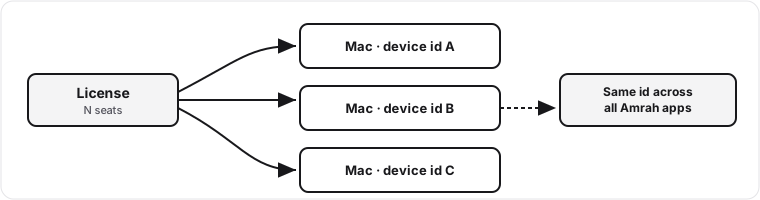
Section titled “Seats (multiple Macs)”A license covers a set number of seats — one seat per Mac. Activating on a new Mac uses a seat. If you hit the limit, deactivate the app on a Mac you no longer use (Settings → License → Deactivate) to free that seat, then activate the new one.
Recover a lost key
Section titled “Recover a lost key”Lost your key? Use Retrieve my keys on the website (or in the app’s activation screen) and enter your purchase email — we’ll email your keys. For your privacy the response is always the same whether or not an account exists.
Upgrades
Section titled “Upgrades”One-time licenses are perpetual for the major version you bought. A future major version may be a paid upgrade; if so, the app tells you and offers Upgrade (your existing activation keeps working on the version you own).
What we receive {#what-we-receive}
Section titled “What we receive {#what-we-receive}”When you activate or your app checks for updates, our license server receives only:
- your license key,
- a device identifier — a value hashed from your computer’s hardware (we never get the raw hardware value; it isn’t your name), and
- the product name.
No photos, documents, or personal files. The device identifier is stable per Mac and the same across Amrah Studio apps, which lets us enforce seat limits and detect license sharing. It is used only for license enforcement — never for advertising or web tracking. See our Privacy Policy for details.
Activation problems
Section titled “Activation problems”- “Seat limit reached.” Deactivate on a Mac you no longer use, then retry.
- “This key is for a different product.” Use the key that matches the app.
- “This license has expired.” Subscriptions need an active period; renew or contact support.
Still stuck? Email support@amrahstudio.com.